A Nissan Ariya that won’t start almost always comes down to one of three causes: a dead 12V auxiliary battery, a vehicle-control-module software fault blocking high-voltage initialization, or a charge-port latch error that keeps the car out of “Ready” mode. A dash that stays completely dark and unresponsive to the key fob is the clearest sign the 12V system has lost power. The Ariya is Nissan’s electric crossover, on sale in the US since 2023 and built on the CMF-EV platform, and unlike the Chevy Blazer EV or a Tesla, it uses a normal front hood rather than a latched frunk, which changes where you go looking for the fix.

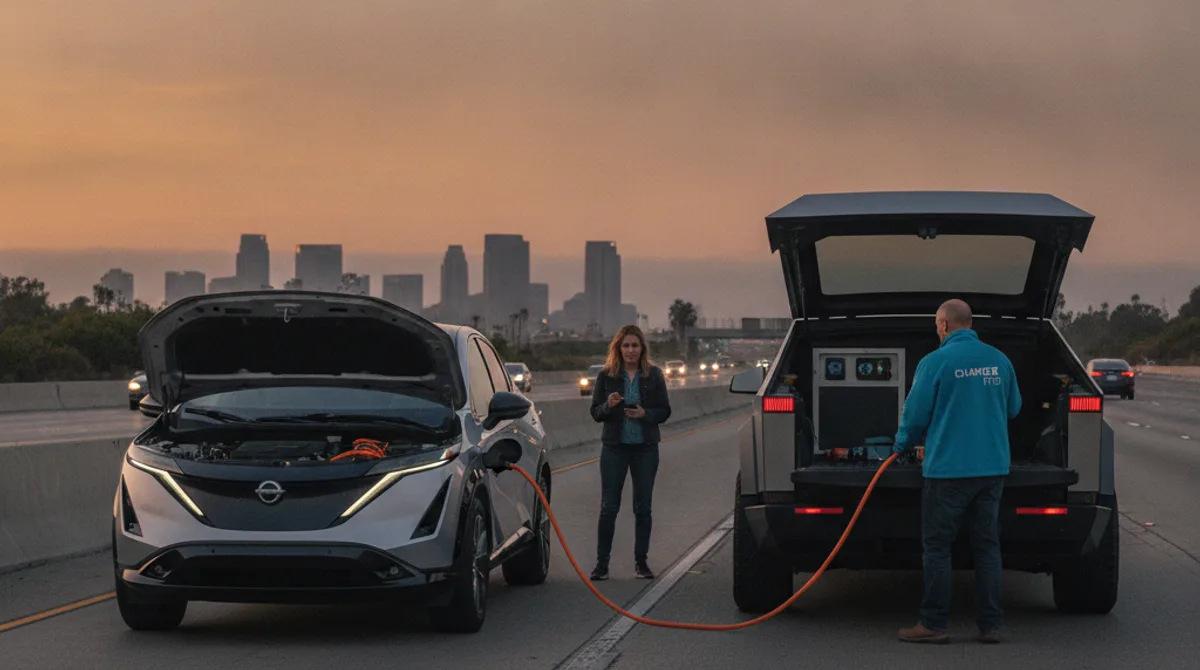
Mobile EV rescue truck assisting a Nissan Ariya stranded on a San Diego County road.

The 12V battery: where it lives in the Ariya

Like every production EV, the Ariya runs two separate electrical systems. The high-voltage traction battery drives the motors; a conventional 12V auxiliary battery powers everything else. Door locks, the dash, infotainment, body control modules, and the computers that authorize the high-voltage system to switch on all pull from the 12V. When the 12V dies, the car won’t power up, no matter how much charge sits in the main pack.

The Ariya keeps its 12V battery under a conventional front hood, the same setup most drivers already know from gas cars. There’s no latched frunk to fight with and no hidden emergency release to hunt down in the owner’s manual. Pop the hood, and the 12V battery and its jump terminals are right there.

To jump the car, connect a jump pack to the 12V positive terminal and a chassis ground point under the hood. Give the 12V system 60 to 90 seconds to recover before pressing the power button. Use a jump pack rated for at least 400 cold cranking amps so it can actually push the 12V system back to life.

Why your Nissan Ariya won’t start: software and charge-port faults

Beyond a dead 12V, the next most common no-start cause on an Ariya is a software or vehicle-control-module fault that blocks the high-voltage system from initializing. Owners report the 12V discharging on its own when the car sits parked for extended periods, which drains the very battery the car needs to boot its computers and check in with the high-voltage system.

A software-related no-start looks different from a simple dead 12V:

  • The dash flickers on briefly, then cuts out, rather than staying fully dark.
  • The car boots normally but shows a system warning and won’t enter “Ready.”
  • The charge port shows a locked icon and the car won’t release the connector or confirm a charge session.
  • Everything looks normal on the dash, but the power button does nothing.

The standard field fix for a software hang is a full 12V power cycle. Open the hood, find the 12V battery, and disconnect the negative terminal for about two minutes. Reconnect it, let the modules sequence back up, then try a normal start. This clears a stuck boot state in the body control modules and lets the vehicle reinitialize from scratch, and it resolves the majority of software-hang no-starts without any special tools.

A charge-port latch error is the third common cause. If the port won’t release or the dash shows a locked-connector icon, the car may be stuck out of “Ready” even with a healthy 12V. The same power cycle often clears this too. If persistent high-voltage warnings remain after a power cycle, that’s a Nissan dealer diagnostic job, not something to force through in a parking lot.

Dash state and what it likely means

Reading the dash correctly saves time before you even reach for a jump pack. Here’s how to interpret what you’re seeing:

Dash stateWhat it likely means
Completely dark, no response to key fob12V battery fully dead
Dash flickers on then off repeatedlyModule boot loop; try a 12V power cycle
Dash boots normally, system warning, won’t enter ReadySoftware or high-voltage fault
Charge port shows locked icon, won’t releaseCharge-port latch error
Doors unlock but dash stays dim12V low but not dead; try a jump pack

A totally dark dash with zero fob response is the most common situation Charge Pro sees on Ariyas across San Diego. It’s a 12V problem, and a jump pack at the under-hood terminals plus a few minutes of patience puts the car back online.

What to do if you’re stranded in San Diego

Ariya drivers show up across San Diego County in a few predictable patterns. North County commuters running I-15 or SR-78 daily, coastal drivers who park overnight near the beach, and downtown commuters using parking structures each hit no-start situations a little differently.

North County commuter corridors (I-15, SR-78, I-5). Long daily commutes on these corridors put real hours on a 12V battery. Park overnight with a marginal 12V after a long freeway day, and there’s a real chance the car won’t wake up the next morning. A jump pack in the trunk is worth the trunk space if you’re doing this drive regularly.

Coastal overnight parking (Encinitas, Carlsbad, Del Mar). Leaving an Ariya parked overnight near the coast shouldn’t drain a healthy 12V under normal conditions. But a marginal battery combined with always-on connectivity modules can tip it over the edge by morning, especially after a few consecutive nights outdoors.

Downtown and Midtown parking structures. San Diego’s multilevel garages don’t always have Level 2 chargers nearby. An Ariya that sits for a long stretch at a low state of charge, combined with a weak 12V, can trip a protection mode that locks the car out of “Ready.” Without knowing the reset sequence, it reads exactly like a dead car.

For any of these situations, our non-Tesla EV rescue service covers the Ariya and other non-Tesla EVs across the county. Charge Pro SD reaches most coastal and central San Diego locations in 25 to 40 minutes. North American Ariya units use a CCS Combo charge port, and the rescue rig carries a CCS adapter, so it can deliver charge directly on-site rather than requiring a tow. If the car is genuinely out of charge rather than stuck in a software fault, the rig can put roughly 30 to 60 miles of range back in the pack via a 240V / CCS setup. Learn more about out-of-charge recovery, or read our Nissan Leaf no-start guide if you’re comparing notes across the Nissan EV lineup.

Frequently asked questions

How do you jump start a Nissan Ariya?

Open the hood and locate the 12V battery, the same way you would on a gas car. Connect a jump pack’s positive clamp to the 12V positive terminal and the negative clamp to a chassis ground point nearby. Wait 60 to 90 seconds for the 12V system to recover, then press the power button. Use a jump pack rated for at least 400 cold cranking amps. For the general safety steps that apply across EV brands, see our guide on how to jump-start an EV safely.

What does a completely dark dash on a Nissan Ariya mean?

A dark dash with no response to the key fob means the 12V auxiliary battery is dead. The dash, locks, and infotainment all run off the 12V system, not the high-voltage traction pack, so no 12V power means no dash and no way for the high-voltage system to initialize. A jump pack at the under-hood terminals is the fix for most dark-dash no-starts.

Can a Nissan Ariya have a no-start even with a full charge in the battery?

Yes. A vehicle-control-module software fault or a charge-port latch error can keep the car out of “Ready” mode even when the high-voltage pack shows a full charge. The fix is usually a full 12V power cycle: disconnect the negative terminal for about two minutes, reconnect, and retry. If the fault persists after that, it’s time for a Nissan dealer diagnostic scan rather than repeated attempts in the field.

Why does my Nissan Ariya’s 12V battery keep dying when it’s parked?

Some Ariya owners report the 12V discharging on its own during extended parking, even with the high-voltage pack fully charged. The 12V system runs the car’s connectivity and control modules continuously in the background, and a marginal battery can drain faster than expected over several days parked. If this keeps happening, it’s worth having the 12V battery and its charging circuit checked, since a battery nearing end of life will drain faster each time. Our EV 12V battery replacement guide covers when a jump is enough and when the battery itself needs to be swapped.

Does Charge Pro come to North County or coastal San Diego for a Nissan Ariya?

Yes. Charge Pro SD covers all of San Diego County, including North County commuter corridors, coastal communities like Encinitas, Carlsbad, and Del Mar, and downtown and Midtown neighborhoods. Typical dispatch time to most coastal and central locations is 25 to 40 minutes. Call (858) 400-4465 for same-day EV roadside assistance anywhere in San Diego.

How much does mobile EV rescue cost for a Nissan Ariya in San Diego?

A 12V jump start and power cycle typically costs less than a standard tow. A mobile charge delivery that puts 30 to 60 miles back in the car on-site is often comparable to or less than a tow-plus-charge combination. For a same-day quote, call Charge Pro SD at (858) 400-4465. See our full mobile EV charging cost guide for a detailed breakdown.


If your Nissan Ariya won’t start and you’re anywhere in San Diego County, call Charge Pro SD at (858) 400-4465. We carry the jump gear and CCS charge capability to handle most Ariya no-start scenarios on-site, and we cover the full county from San Diego to North County to the east.